Create a reusable recipe
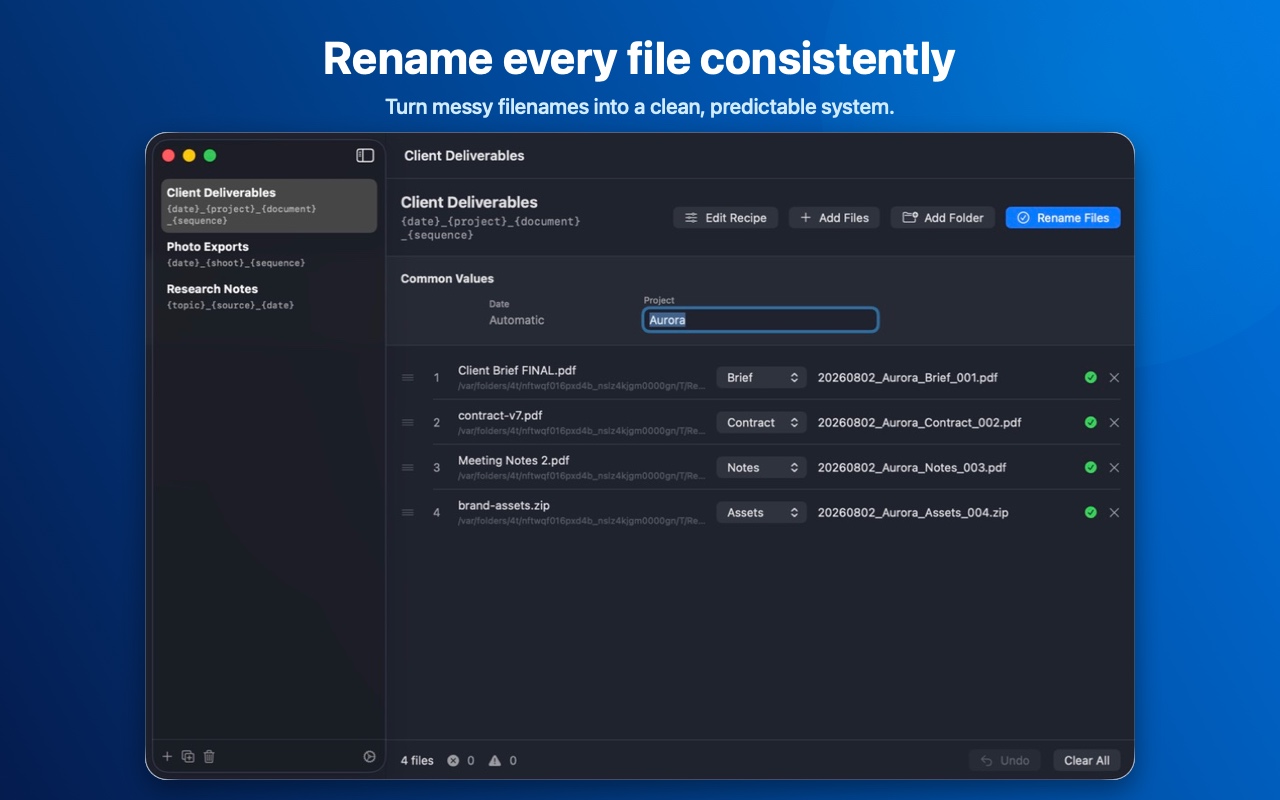
Combine dates, text, choices, sequences, and original filenames into a pattern that matches your workflow.
 Rename Recipes
Reusable file naming for macOS
Build a naming rule once, preview every result, and safely rename files together. Rename Recipes keeps the whole workflow local to your Mac.
$4.99 one-time purchase in the U.S. No account, subscription, analytics, or file uploads.
A repeatable workflow
Turn the way you already name files into a reusable recipe.
Combine dates, text, choices, sequences, and original filenames into a pattern that matches your workflow.
Review the exact result before anything changes. Duplicate names, missing values, and collisions are caught first.
Extensions are preserved, name swaps are handled safely, and the latest batch can be undone while the app is open.
See the result first
Add a folder, enter the shared values your recipe needs, and inspect every generated filename in one place. Rename Recipes changes nothing until you confirm.
Private by design
Rename Recipes has no accounts, ads, analytics, tracking, or third-party data-collection SDKs. Filename processing and saved recipes remain local.
Effective August 2, 2026
Rename Recipes does not collect, transmit, sell, or share personal data. The app does not include advertising, analytics, tracking, or third-party data-collection SDKs.
The app only accesses files and folders that you explicitly select. This access is used to preview filenames, rename files, and undo the most recent rename operation while the app remains open. File contents are not read, analyzed, or uploaded.
Saved recipes and preferences are stored locally. You can remove them by deleting recipes and app preferences, or by uninstalling the app and its local application data.
Rename Recipes does not knowingly collect personal information from anyone, including children.
Any future update will be published on this page with a revised effective date.
Support
For installation or product questions, open a GitHub issue with a clear description of the problem. Do not attach private filenames, client information, or confidential files.